
Introduction to Tk themed widgets
Tkinter has two generations of widgets:
- The old classic
tkwidgets. Tkinter introduced them in 1991. - The newer themed
ttkwidgets added in 2007 with Tk 8.5. The newer Tk themed widgets replace many (but not all) classic widgets.
Note that ttk stands for Tk themed. Therefore, Tk themed widgets are the same as ttk widgets
The tkinter.ttk module contains all the new ttk widgets. It’s a good practice to always use themed widgets whenever they’re available.
The following statements import the classic and the new Tk themed widgets:
import tkinter as tk
from tkinter import ttkCode language: Python (python)
And the following program illustrates how to create classic and themed labels:
import tkinter as tk
from tkinter import ttk

root = tk.Tk()

tk.Label(root, text='Classic Label').pack()
ttk.Label(root, text='Themed Label').pack()

root.mainloop()Code language: Python (python)
Output:
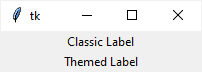
They look similar. However, their appearances depend on the platform on which the program runs.
Advantages of using Tk themed widgets
By using the Tk themed widgets, you gain the following advantages:
- Separating the widget’s behavior and appearance – the ttk widgets attempt to separate the code that implements the widgets’ behaviors from their appearance through the styling system.
- Native look & feel – the ttk widgets have the native look and feel of the platform on which the program runs.
- Simplify the state-specific widget behaviors – the ttk widgets simplify and generalize the state-specific widget behavior.
The ttk widgets
The following ttk widgets replace the Tkinkter widgets with the same names:
- Button
- Checkbutton
- Entry
- Frame
- Label
- LabelFrame
- Menubutton
- PanedWindow
- Radiobutton
- Scale
- Scrollbar
- Spinbox
And the following widgets are new and specific to ttk:
- Combobox
- Notebook
- Progressbar
- Separator
- Sizegrip
- Treeview
Summary
- Tkinter has both classic and themed widgets. The Tk themed widgets are also known as
ttkwidgets. - The
tkinter.ttkmodule contains all thettkwidgets. - Do use
ttkwidgets whenever they’re available.


