What is a pre-processor?
Pre-processing is a program that will be executed automatically before passing the source program to the compiler. Pre-processing is under the control of pre-processor directives. All preprocessor directives start with a pound (#) symbol & should be not ended with a semicolon (;). When we are working with pre-processor directives, they can be placed anywhere within the program but are recommended to place on top of the program before defining the first function.
How many types of pre-processor detectives are there in the c programming language?
In C programming language pre-processor directives are classifieds into 4 types, such as
- Macro substitution directives. Example: #define
- File inclusion directives. Example: #include
- Conditional compilation directives. Example: #if, #else, #endif, #ifdef, #ifndef, #undef, etc
- Miscellaneous directives. Example: #pragma, #error, #line, etc
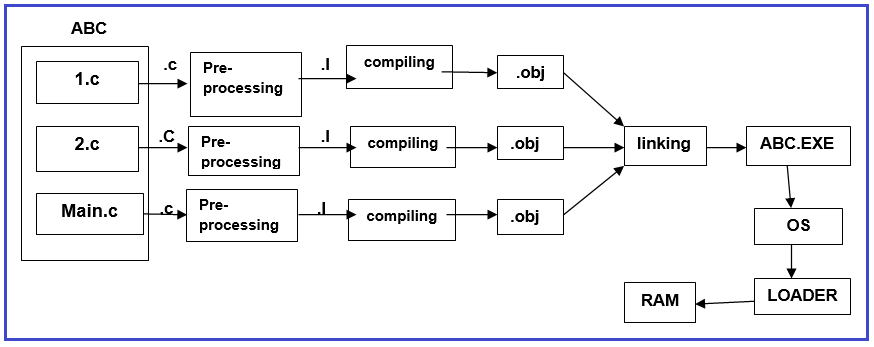
How is the executable file created in the C programming language?
When we are working with any kind of C application, we are required to perform 4 steps:
- Editing
- Compiling
- Linking
- Loading
Editing:
It is a process of constructing the source program and saving with .c extension. .c file contains the source code of the application i.e. user-readable format data. To perform the editing process, we required any kind of text editors like a notepad, word pad, or any other C language-related IDE.
Compiling:
It is a process of converting high-level programming language code into machine-readable data i.e. object code or compiled code. When the compilation process will complete then we will get the “.OBJ” file. The “.OBJ” file contains the compiled code. To compile any C-program we required a C-programming language compiler like GCC, Turbo-C, etc
Linking:
It is a process of combining all obj files of the current project along with standard lib or obj files to construct an executable file. When the linking process is successful then the automatically executable file is generated with the “.exe” extension. .exe file contains the native code of the operating system
Loading:
It is a process of carrying the application file (.exe file) from the secondary storage area to primary memory i.e. RAM. Editing, compiling, and linking are under the control of IDE, and loading is under the control of the Operating System. When we are working with any C application, it creates 5 types of files i.e. .c, .BaK, .exe, .I, .obj
- .c, .I, .Bak contains user-readable format data i.e. source format. Generally, “.I” file contains extended source code that is constructed after pre-processing.
- .obj file contains compiled code that can be understandable to the system only.
- .exe file contains the native code of OS.
For a better understanding of the above-discussed points, please have a look at the following diagram.